10 Top Root Apps For Android - August Edition
Are you looking for Top root apps for Android? Here we have listed 10 Top Root Apps for Android that you should use in August.

On this page
Are you looking for Top root apps for Android? Here we have listed 10 Top Root Apps for Android that you should use in August. These apps are very useful and powerful to customize your android and for simplifying your personalization.
These apps are very useful and powerful to customize your android and for simplifying your personalization needs. Of course, make sure that your android is rooted.
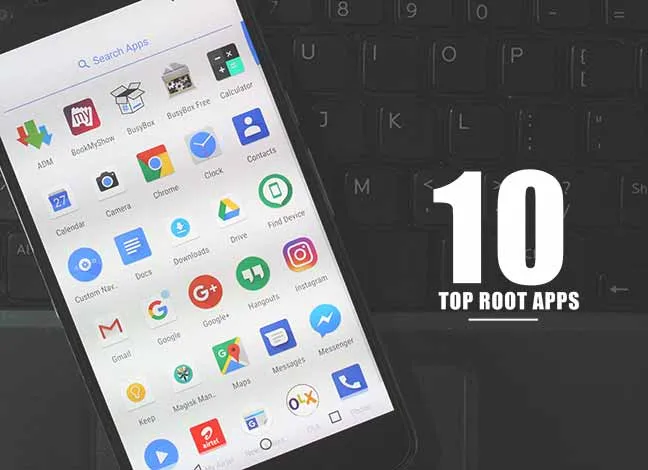
10 Top Root Apps For Android - August Edition
I have included a bunch of useful apps to be used on rooted phones. I handpicked all the apps to ensure a quality experience. Here we go with the August List of Top Root Apps. I hope you will enjoy these Root apps in August.
1. BuildProp Editor
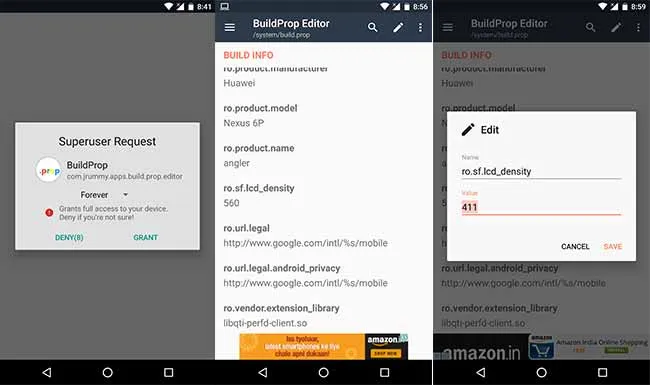
Have you ever wondered about making changes in your Android device settings? BuildProp Editor is a tool which allows you to edit your build.prop or any other properties file on your Android device. BuildProp Editor comes with a powerful and cool code editor with syntax-highlighting for multiple languages. Using BuildProp Editor, you can edit system build.prop property file easily. The app also helps you to make backups before making any changes in system files.
Download BuildProp Editor from Play Store (This app was removed from the Google Play Store)
2. Greenify
Most of the people root their android with the motive that their smartphone’s battery life will prolong. Even, I personally use Greenify to save my phone’s battery. There are some great features like, It shows the apps running in the background and how many times it wakes up your device. It also gives you an option to hibernate the background running apps to save battery life. We can say, Greenify is a Power saver for our devices.
Download Greenify from Google Play Store
3. Link2SD
Android OS does not allow us to move default system apps to SD Card. But, this app gives potential to our android to move any apps from internal to external. Even you can move the .obb file of heavy games easily without any problem. Link2SD uses a secondary partition on your SD card and uses it as another segment of internal storage.
Download Link2SD from Google Play Store
4. ROM Toolbox Lite
ROM Toolbox is an All-in-one Monster app which brings a lot of features of different apps in it. It has all the tools which you need to customize your Android device. Using ROM Toolbox can help you to install custom ROM, create, manage & restore Android backups, wipe data, cache, dalvik-cache, battery stats and etc.
Download ROM Toolbox Lite from Google Play Store
5. Titanium Backup
This is one of the best utility apps to backup your Android data. It allows you to backup android apps with their settings. It is a leading Android application that uses root access to pull all your important applications and data from the system partition and stores them for future restoration. You can also purchase the paid version to unlock more features.
Download Titanium Backup from Google Play Store
6. Flashify

It is a cool app which lets you flash boot, recovery.img and .zip files easily. Flashify can also be used to backup your current image and kernel, either to your internal storage or external storage. Flashify also keeps records of everything that it’s done to your phone or tablet. Next time, if you want to run any upcoming android software on your device then you can use Flashify to flash the package and use the newest features before any other people. Flashify is free to download but, if you want to extend the features then you can choose the paid APK which offers a huge list of advanced features.
Download Flashify from Google Play Store (Flashify has been abandoned and removed from Google Play Store)
7. System App Remover
It is a simple and intuitive app that lets you uninstall any system app. It helps us to remove or delete the unnecessary app which generally consumes the device storage. With this cool feature, System app Remover also allows moving your apps to the SD card. You can also move your apps to internal phone storage from anywhere. It means it works as a un Installer tool as well as an Apk manager.
Download System App Remover from Google Play Store
8. Adaway
When it comes to ad blocking on Android, there’s no better app than AdAway. The popular root mod filters out ads at the host’s file level, so no extra processing power is used, and your phone is literally incapable of loading most ads. AdAway is designed specifically for Android devices to work flawlessly with the android operating systems and it works with almost all the browsers available for Android smart phones.
9. FontFix
In most of the Android devices, font customisation feature is not available. Here, FontFix is the app which helps us to change our system default font. If your device is rooted then, FontFix will change the system fonts on your phone or tablet. Using this app, you can browse to Thousands of fonts and install them. You can also download and install custom fonts by downloading the .ttf file.
Download FontFix (The app was abandoned and removed from the Google Play Store)
10. Root Browser
This is the File Explorer for advanced users. If you want to explore your system files deeply then Root Browser is the one which can help you. There are two types of file manager panels available in this app. Root Browser Android app allows users to explore APK, JAR, RAR and ZIP files or you can view or edit any file on your Android mobile using it or add new folders to any directory by using this application. It means, if you want to explore your Android device then Download and Install Root Browser app.
Download Root Browser APK (The app was abandoned and removed from the Google Play Store)
So, above was the incredible List of 10 Top Root Apps for Android. All these apps work perfectly in most of the devices. If any of them is not working properly then contact to the app developer or comment below. I hope you will enjoy these apps in August. Let’s see the Top Root Apps for next month.
Comments
Comments are moderated, and published only if they are relevant to the topic and add value in a constructive way. If you disagree with something, please be polite and respectful. We suggest you read our comment policy before commenting.