
On this page
“ARCore” is now officially known as “Google Play Services for AR” in Play Store’s listing. However, it is still known as “ARCore” in Google’s developer platform. Through this post, you can download the latest v1.17.20042008 version of Google Play Services for AR (ARCore) app as an APK file, along with all the previous versions. Now before you do that, take some time to understand what ARCore actually is and how it works.
What is Google ARCore?
ARCore is Google’s Software Development Kit (SDK) for building augmented reality (AR) applications on various platforms including Android. According to Google, it enables your phone to “sense its environment, understand the world, and interact with information”.
So, how does ARCore work? – It uses three fundamental technologies to integrate virtual content with the real world using your Android phone’s camera.
- Motion Tracking: It allows your phone to identify interesting points (known as “features”) and tracks how these points move over time to understand its position relative to the world.
- Environmental Understanding: Using the same technology, it allows your phone to detect a cluster of points (known as “Planes”) that appear to lie on a horizontal or vertical surface. This helps ARCore memorize the size and location of all types of surfaces: Horizontal, Vertical, and Angled.
- Light Estimation: It allows your phone to understand the environment’s current lighting conditions to provide you with an average intensity and color correction. This allows the AR app to properly light virtual objects according to the environment’s lighting conditions to favor realism.
* A majority of the information provided above was taken from this Google’s Developer page.
List of Google ARCore Supported Devices
In order for an Android device to be officially supported by ARCore, it must pass Google’s certification process. The process involves checking the device’s camera quality, motion sensing capability, and hardware design, to ensure that users get a refined experience when using augmented reality applications.
According to Google, the following is the list of Android devices officially supported by Google ARCore.
| Asus | ROG Phone |
| Asus | ROG Phone II |
| Asus | ROG Phone III |
| Asus | Zenfone 6 (6z) |
| Asus | Zenfone 7 |
| Asus | Zenfone 7 Pro |
| Asus | Zenfone AR |
| Asus | Zenfone ARES |
| Fujitsu | Arrows 5G |
| Fujitsu | Arrows NX9 F-52A |
| General Mobile | GM 9 Plus |
| Nexus 5X | |
| Nexus 6P | |
| Pixel | |
| Pixel XL | |
| Pixel 2 | |
| Pixel 2 XL | |
| Pixel 3 | |
| Pixel 3 XL | |
| Pixel 3a | |
| Pixel 3a XL | |
| Pixel 4 | |
| Pixel 4 XL | |
| Pixel 4a | |
| Pixel 4a 5G | |
| Pixel 5 | |
| HMD Global | Nokia 3.4 |
| HMD Global | Nokia 5.4 |
| HMD Global | Nokia 6 (2018) |
| HMD Global | Nokia 6.1 Plus |
| HMD Global | Nokia 6.2 |
| HMD Global | Nokia 7 Plus |
| HMD Global | Nokia 7.1 |
| HMD Global | Nokia 7.2 |
| HMD Global | Nokia 8 |
| HMD Global | Nokia 8 Sirocco |
| HMD Global | Nokia 8.1 |
| HMD Global | Nokia 8.3 5G |
| Huawei | Honor 8X |
| Huawei | Honor 10 |
| Huawei | Honor View 10 Lite |
| Huawei | Honor V20 |
| Huawei | Mate 20 Lite |
| Huawei | Mate 20 |
| Huawei | Mate 20 Pro |
| Huawei | Mate 20 X |
| Huawei | Nova 3 |
| Huawei | Nova 3i |
| Huawei | Nova 4 |
| Huawei | P20 |
| Huawei | P20 Pro |
| Huawei | P30 |
| Huawei | P30 Pro |
| Huawei | Porsche Design Mate RS |
| Huawei | Porsche Design Mate 20 RS |
| Huawei | Y9 2019 |
| Infinix Mobile | Note 6 |
| Infinix Mobile | Note 7 |
| Infinix Mobile | Zero 8 |
| Kyocera | Torque G04 |
| LG | G6 |
| LG | G7 Fit |
| LG | G7 One |
| LG | G7 ThinQ |
| LG | G8 ThinQ |
| LG | G8S ThinQ |
| LG | G8X ThinQ |
| LG | G Pad 5 10.1 FHD |
| LG | K61 |
| LG | K71 |
| LG | K92 |
| LG | Q6 |
| LG | Q70 |
| LG | Q8 |
| LG | Q92 |
| LG | style2 |
| LG | style3 |
| LG | Stylo 5 |
| LG | Stylo 6 |
| LG | V30 |
| LG | V30+ |
| LG | V30+ JOJO |
| LG | LG Signature Edition 2017 |
| LG | V35 ThinQ |
| LG | LG Signature Edition 2018 |
| LG | V40 ThinQ |
| LG | V50 ThinQ |
| LG | V50S ThinQ |
| LG | LG Signature Edition 2019 |
| LG | V60 ThinQ 5G |
| LG | VELVET 5G |
| LG | WING 5G |
| Motorola | Moto G5S Plus |
| Motorola | Moto G6 |
| Motorola | Moto G6 Plus |
| Motorola | Moto G7 |
| Motorola | Moto G7 Play |
| Motorola | Moto G7 Plus |
| Motorola | Moto G7 Power |
| Motorola | Moto G8 |
| Motorola | Moto G8 Play |
| Motorola | Moto G8 Plus |
| Motorola | Moto G8 Power |
| Motorola | Moto G8 Power Lite |
| Motorola | Moto G9 Play |
| Motorola | Moto G9 Plus |
| Motorola | Moto G9 Power |
| Motorola | Moto G 5G |
| Motorola | Moto G Power |
| Motorola | Moto G Pro |
| Motorola | Moto G Stylus |
| Motorola | Moto G Stylus (2020) |
| Motorola | Motorola Edge |
| Motorola | Motorola Edge Plus |
| Motorola | Motorola One |
| Motorola | Motorola One 5G |
| Motorola | Motorola One Action |
| Motorola | Motorola One Fusion |
| Motorola | Motorola One Fusion+ |
| Motorola | Motorola One Hyper |
| Motorola | Motorola One Macro |
| Motorola | Motorola One Power |
| Motorola | Motorola One Vision |
| Motorola | Motorola One Zoom |
| Motorola | Moto X4 |
| Motorola | Moto Z2 Force |
| Motorola | Moto Z3 |
| Motorola | Moto Z3 Play |
| Motorola | Moto Z4 |
| OnePlus | OnePlus 3T |
| OnePlus | OnePlus 5 |
| OnePlus | OnePlus 5T |
| OnePlus | OnePlus 6 |
| OnePlus | OnePlus 6T |
| OnePlus | OnePlus 7 |
| OnePlus | OnePlus 7 Pro |
| OnePlus | OnePlus 7 Pro 5G |
| OnePlus | OnePlus 7T |
| OnePlus | OnePlus 7T Pro |
| OnePlus | OnePlus 8 |
| OnePlus | OnePlus 8 Pro |
| OnePlus | OnePlus 8T |
| OnePlus | OnePlus Nord |
| Oppo | A52 |
| Oppo | A72 |
| Oppo | A72 5G |
| Oppo | A92 |
| Oppo | A92S |
| Oppo | F11 Pro |
| Oppo | F15 |
| Oppo | F17 Pro |
| Oppo | Find X2 |
| Oppo | Find X2 Pro |
| Oppo | K3 |
| Oppo | K5 |
| Oppo | R17 Pro |
| Oppo | Reno2 |
| Oppo | Reno2 F |
| Oppo | Reno2 Z |
| Oppo | Reno3 |
| Oppo | Reno3 5G |
| Oppo | Reno3 A |
| Oppo | Reno3 Pro |
| Oppo | Reno3 Pro 5G |
| Oppo | Reno4 4G |
| Oppo | Reno 10x Zoom |
| Oppo | Reno A |
| Oppo | Reno Z |
| realme | 5 |
| realme | 5 Pro |
| realme | 6 |
| realme | 6 Pro |
| realme | 7 |
| realme | 7i |
| realme | 7 Pro |
| realme | Narzo 20 Pro |
| realme | Q |
| realme | X |
| realme | X Lite |
| realme | XT |
| realme | X2 |
| realme | X2 Pro |
| realme | X3 Super Zoom |
| realme | X7 5G |
| realme | X7 Pro 5G |
| realme | X50 Pro |
| realme | X50t 5G |
| realme | V5 5G |
What’s new in ARCore?
Below is the complete changelog for the latest version of Google Play Services for AR app, along with that for the previous versions.
v1.17.20042008 - Released on May 11, 2020
- Improved rendering performance on select devices with supporting AR apps.
v1.16.20030204 - Released on March 16, 2020
<div class=“tab-content”><div id=“whatsnew” class=“tab-pane fade in active” role=“tabpanel”><div class=“row”><ul><li class=“notes”>Improved rendering performance on select devices with supporting AR apps.</li></ul></div></div></div>
v1.15.20012104 - Released on 6 February 2020
<div class=“tab-content”><div id=“whatsnew” class=“tab-pane fade in active” role=“tabpanel”><div class=“row”><ul><li class=“notes”>Improved rendering performance on select devices with supporting AR apps.</li></ul></div></div></div>
v1.15.20012103 - Released on 3 February 2020
<div class=“tab-content”><div id=“whatsnew” class=“tab-pane fade in active” role=“tabpanel”><div class=“row”><ul><li class=“notes”>Improved rendering performance on select devices with supporting AR apps.</li></ul></div></div></div>
v1.14.19111810 - Released on 20 December 2019
- Smoother AR experiences on Pixel 4 and Pixel 4 XL with a viewfinder frame rate of 60 frames per second.
- Bug fixes.
v1.14.19111808 - Released on 12 December 2019
- Improved support for multiplayer and collaborative AR experiences.
- Lighting estimation for realistic AR experiences will now react faster to changes in ambient lighting.
Download ARCore (Google Play Services for AR) APK
Google introduced ARCore back in 2017 and it was only recently renamed “Google Play Services for AR” to be a part of the Google Play Services. Android devices that are officially supported by ARCore can install and update the app directly via the Play Store.
However, if the app is not available on the Play Store for your device due to some reason, then you can download the latest Google Play Services for AR APK (courtesy of APKMirror.com) from below and install it manually.
→ Latest version: Google Play Services for AR v1.17.20042008 APK
Previous versions
Below we have also provided download links for all the previous versions of the app as well, in case you need them.
- v1.16.20030204
- v1.15.20012104
- v1.15.20012103
- v1.14.19111810
- v1.14.19111808
- v1.13.19100710
- v1.13.19100709
- v1.12.19082610
- v1.12.19082605
- v1.11.19071518
- v1.11.19071515
- v1.11.19071510
- v1.10.19060311
- v1.10.19060310
- v1.10.19060306
- v1.9.19042206
How to Install Google Play Services for AR (ARCore) APK
In order to install the APK manually, you must first enable the “Install unknown apps” or “Unknown sources” option on your Android device.
- On Android 8.0/8.1 Oreo, Android 9 Pie, & Android 10 Q: Go to ‘Settings’ → ‘Apps & notifications’ and tap on ‘Advanced’ to expand the menu. Now go to the ‘Special app access’ section and select ‘Install unknown apps’. In this menu, you will need to grant the required permissions to your file manager app.
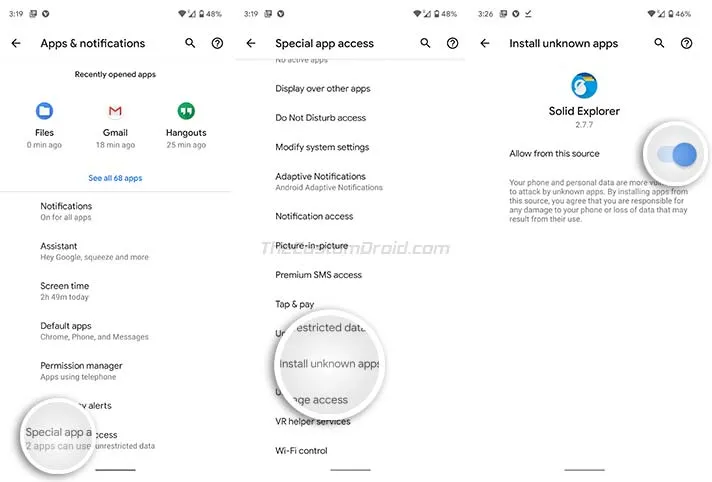
- On Android 7.0/7.1 Nougat or below: Go to ‘Settings’ → ‘Security’ and turn on the ‘Unknown sources’ toggle.
Once you have enabled the required option, follow the steps below to install ARCore APK on your Android device.
- Download the latest Google Play Services for AR (ARCore) APK.
- Open a file manager app on your supported Android device.
- Navigate to the folder where the APK file was downloaded.
- Tap on the APK file to initiate the Android package installer.
- Tap on the ‘Install’ button to install the app on your device.
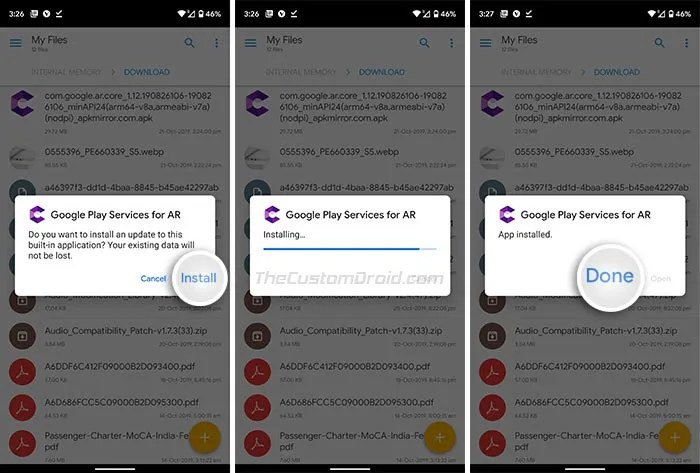
- Once finished, press “Done”.
Now that you have ARCore installed, you can go ahead and try several augmented reality apps/features on your device. For instance, you can try Pokemon Go’s AR+ mode feature or download Google’s Measure app for taking everyday measurements easily. ARCore also enables you to use Playground (AR Stickers) in the Google Camera app.
There you go, you have just been able to download the latest Google Play Services for AR (ARCore) APK, along with the list of officially supported devices. Let us know your favorite AR app(s) that you would like to recommend via the comments.
Comments
Comments are moderated, and published only if they are relevant to the topic and add value in a constructive way. If you disagree with something, please be polite and respectful. We suggest you read our comment policy before commenting.