How to Hard Reset Xiaomi Mi A1 to Factory Settings (2 Methods)
In this article, we will guide our readers on how to hard reset Xiaomi Mi A1 using stock recovery or settings menu.

In this article, we will guide our readers on how to hard reset Xiaomi Mi A1 using stock recovery or settings menu.
First, let us talk a bit about ‘Factory Reset’ or traditionally called ‘Hard Reset’. It is basically a restoring process of software of an electronic device (like Xiaomi Mi A1 in the present case). This restoring process will bring the device to its original system state. Just like it was when you first took the device out-of-the-box.
This could be done by wiping away all of the information/data amassed on the device so that the software of the device can be brought back to its manufacturer settings.
One of the main reasons as to why you are reading this article is probably the Xiaomi Mi A1 Android Pie update. As we all know, this recent update has caused the device to become vulnerable to many issues. One of the best methods to deal with these issues is to factory reset Xiaomi Mi A1. So the present article is here for your rescue wherein the next few paragraphs will assist you to hard reset Xiaomi Mi A1.
But before you get there, go through a list of situations where factory resetting the device will help you.
- Apps or data slowing down your device over time.
- In case you’re planning to sell your Mi A1.
- Facing software issues like lags, force-closes, etc.
- The latest software update has minor issues.
Well, those are just a few to count. There could be several reasons for why you would want to factory reset Xiaomi Mi A1.
Now, you can factory reset Xiaomi Mi A1 using two different methods. The first method is via device settings and the second one is based on using the stock recovery. Out of the two methods, the former is the easier one and widely adopted by the users.
Hard Reset Xiaomi Mi A1 in Settings
- Go to the app drawer and launch ‘Settings’.
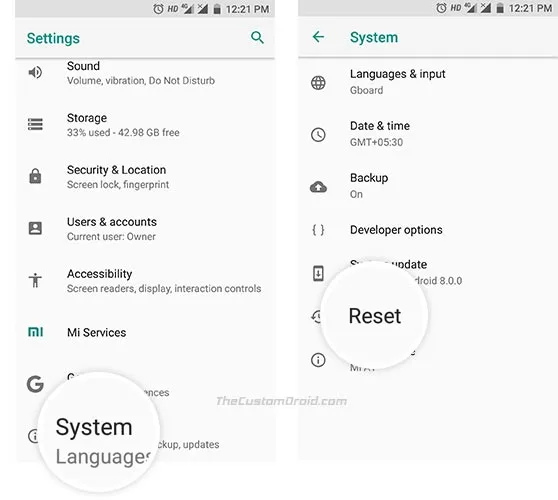
- Open the Reset menu. Out of the following two, choose the one that fulfills your configuration:
- For Android 7.1.2 Nougat: Select ‘Backup & reset’ option.
- For Android 8.0 Oreo**:** Go to ‘System’ -> ‘Reset’.
- Tap on ‘Factory data reset’.
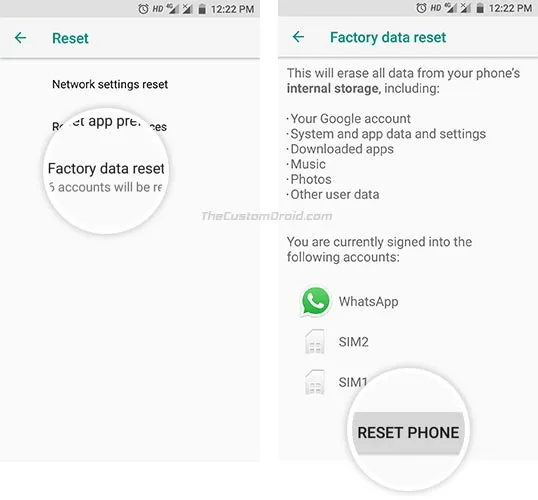
- Scroll down and tap on ‘RESET PHONE’.
- Finally, select ‘ERASE EVERYTHING’ to hard reset Xiaomi Mi A1.
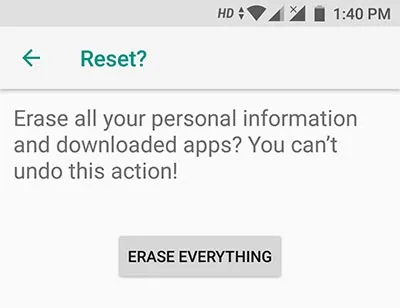
After following the above steps, your phone will reboot and perform a full reset. Now, if your device is stuck in a bootloop or you’re not able to access the OS for some reason, then follow method 2 below. The steps will help you factory reset Xiaomi Mi A1 using stock recovery.
Hard Reset Xiaomi Mi A1 using Stock Recovery
- Switch off the Xiaomi Mi A1
- Press and hold together the Volume Up and Power buttons until Mi logo pops up on the screen.
- Then release the buttons to boot into Stock Recovery.
- An Android bot with the ‘No command’ message should appear on the screen.
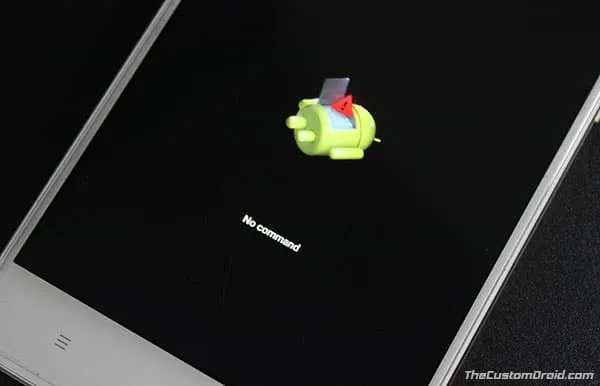
- Hold down the Power button and tap the Volume Up key once.
- Scroll to ‘Wipe data/factory reset’ using Volume button.
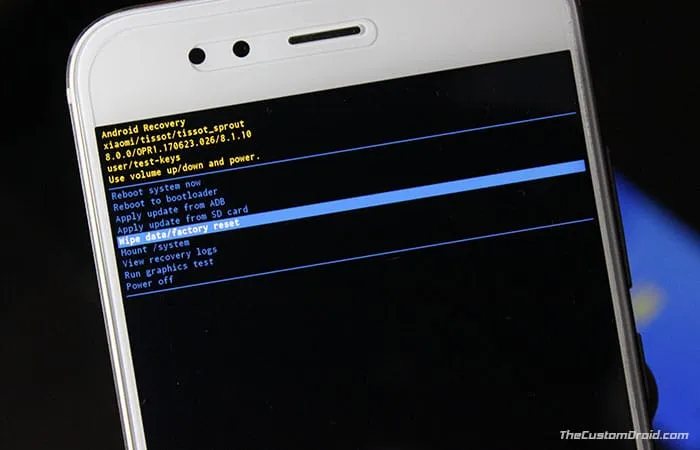
- Select it using the Power button.
- When prompted, select ‘Yes’ to confirm and hard reset Xiaomi Mi A1.
Once your device boots, you will see the initial setup screen. Which means the process was successful.
More on Mi A1
So you have just been able to factory reset Xiaomi Mi A1 using Stock recovery or Settings. If you have any questions, leave them in the comments below.
Comments
Comments are moderated, and published only if they are relevant to the topic and add value in a constructive way. If you disagree with something, please be polite and respectful. We suggest you read our comment policy before commenting.