
On this page
Here you can download the latest Google Camera (GCam) port for OnePlus 6 and OnePlus 6T, followed by the instructions on how to install it.
Installing Google Camera on your OnePlus device will allow you to use Pixel camera app features like Astrophotography Mode, NightSight, HDR+, Playground (AR Stickers), and more for an overall better camera experience. Ports of Google Camera v8.1, v7.4, v7.3, v6.2, and v6.1 are available, along with corresponding XML config files, and recommended settings. These are compatible with any OnePlus 6 or 6T running Android 10 and Android Pie.
At the time of its release, the OnePlus 6, as well as the OnePlus 6T, were well and truly among the best mobile devices in their segment. The critics and users were all heaps and praises for these two smartphones. Powered by the Snapdragon 845 chipset, with an octa-core processor and up to 8 GB of RAM, one could hardly ask for anything more. Add to the fact that it had Android 9.0 Pie out of the box and was updated to Android 10 recently, surely ticked all the boxes.
Coming to the camera department, it surely gave a tough time to the biggest player in this segment (aka Pixel devices). Having a dual rear camera with f/1.7 aperture, it is capable of recording videos at 2160p at 30 and 60 fps. The front camera too is an impressive 16MP with amazing features like Auto-HDR and Gyro Electron-Image-Stabilization.
However, some users still feel that stock OnePlus camera features like the NightScape and Slow Motion are not as finely tuned as they should have been. Also, there are opinions that the stock camera could have incorporated some additional features as well. This includes a Motion Auto Focus, ‘Pro-Mode’ and ‘Manual Focus’ for video recording and ‘Timelapse’.
OnePlus 6/6T Google Camera vs Stock Camera
Google Camera (GCam) port, apart from improving the image and video quality, brings with itself tons of other features. These include Zero Shutter Lag (ZSL) HDR+, Astrophotography Mode, Motion Photos, Portrait Mode, Photobooth, Super Res Zoom, NightSight, Slow Motion, and much more.
The best part about installing this GCam port is that you neither need to unlock the bootloader nor root the device. This is due to the fact that the OnePlus 6/6T fully supports Camera2 API by default.
With that said, have a look at the below pictures clicked by the stock OnePlus 6 camera as well as the Google Camera Port. The images on the left are clicked by the stock camera whereas those on the right are from Google Camera. Which of the two cameras managed to impress you more? Do share your views in the comments section.
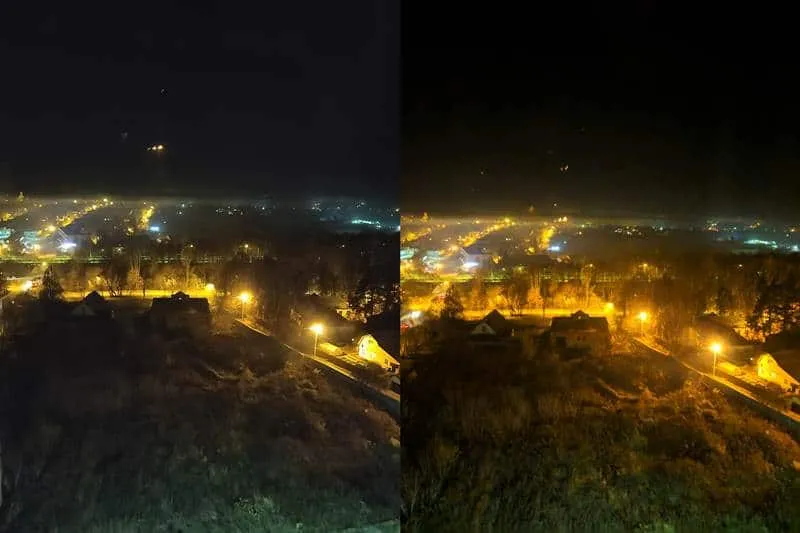
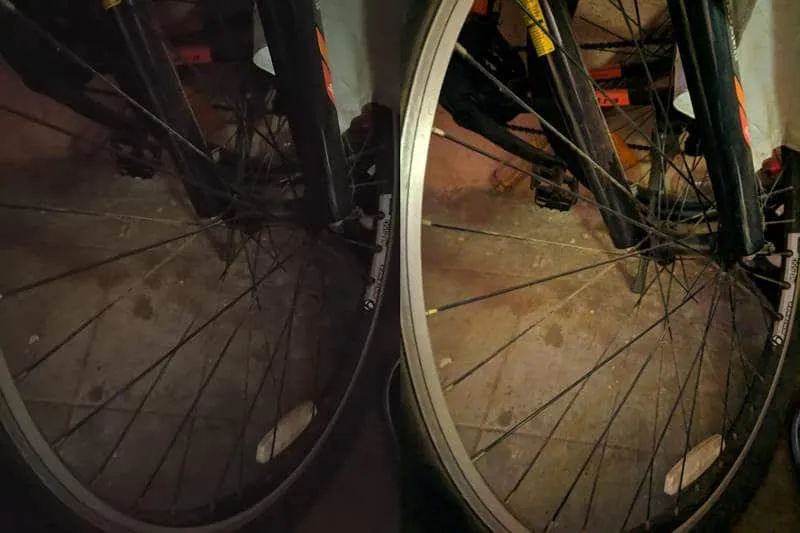
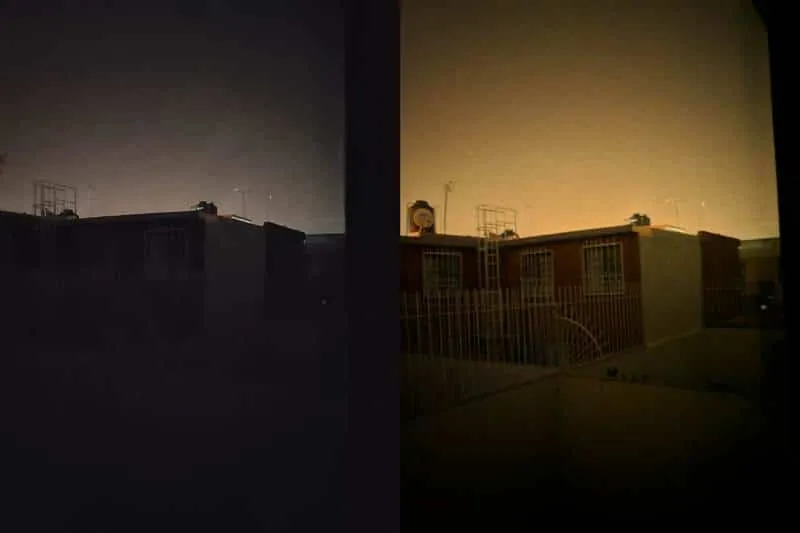
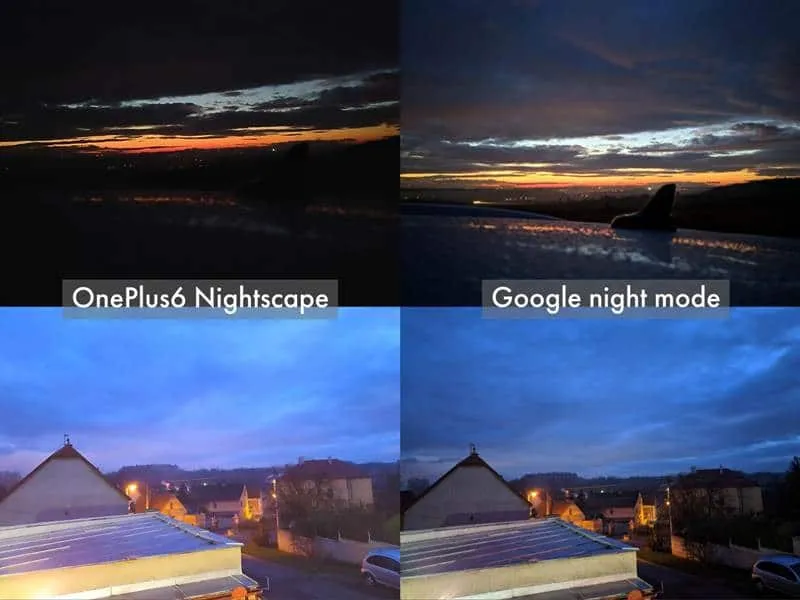
These pictures speak for themselves. The ones taken by the Google Camera Port are more finely tuned and have much more detail than their counterparts. Also, the ‘Night Sight’ feature of GCam is way ahead than the ‘NightScape’ mode of the stock OnePlus camera.
Download OnePlus 6/6T Google Camera Port APK
The recommended and best GCam Ports for OnePlus 6 and OnePlus 6T are from developers Arnova8G2, BSG, macro, Nikita, and Urnyx05.
Along with the link for the Google Camera, there are also corresponding XML config files that could be used to configure the best settings automatically. We strongly suggest that you also go through these important notes to know more about each port and their recommended settings to get better results with Astrophotography and other camera modes.
Notes:
- The ports linked below are the latest at the time of updating this page. If you’re visiting here on a later date make sure that you check the respective developer’s database to check for the latest GCam port available.
- Ports from developer macro already have several XML config files built into them. But if you wish to load configurations manually, then they should be copied to
[internal storage]/GCam/Configs7/Miniqueta - Starting with Google Camera v7.0 ports, the default path to store/load the XML config files is:
[internal storage]/GCam/Configs7 - GCam 8.1 port by BSG does not support XML config files. When using this port, make sure to change the HDR+ device in camera settings to “Pixel 3 XL”.
- Some ports also have a cloned version. These cloned versions use a different package name and are helpful if you want to install and use two (or more) different ports simultaneously.
- Also, when switching or upgrading ports, make sure that you first clear the data and cache of the existing GCam Port from the device settings. Once that is done, uninstall the existing port (uninstall it, don’t overwrite it) and install the new one.
Google Camera 8.1.101 Port by BSG
- Filenames: MGC_8.1.101_A9_PV0e.apk (com.google.android.GoogleCamMGC)
- Download link
- BSG’s database
- Known issues: Slow motion and 4K@60fps recording does not work
Google Camera 7.4 Port by Nikita
-
Filenames:
- NGCam_7.4.104-v2.0_eng.apk (com.google.android.GoogleCameraEng)
- NGCam_7.4.104-v2.0_snap.apk (org.codeaurora.snapcam)
Google Camera 7.4 Port by macro
- Filename: 7.4_GCam_MJL_v5.0_Miniqueta.apk
- Download link
- macro’s database
Google Camera 7.3.018 Port by macro
- Filename: 7.3_GCam_MJL_v4.3_Minilux.apk
- Download link
- macro’s database
Google Camera 7.3.018 Port by Urnyx05
- Filename: GCam_7.3.018_Urnyx05-v2.5.apk
- Download link
- Config files
- Urnyx05’s database
- XDA thread
Google Camera 7.3.018 Port by Arnova8G2 (5BetaFinal2)
- APK File: 7.3_GCam_Arnova_5betaFinal2.apk
- Cloned version (can be used alongside MJL’s port): 7.3_GCam_Arnova_5betaFinal2-clone.apk
- XML Config File: JUAN 5.1.0 ALL.xml
Google Camera 6.1.021 Port by MJL (MJL Minikon V3.4)
- APK File: 6.1_GCam_MJL_v3.4_Miniflex.apk
- XML Config Files are already included
- Notes: This is the most stable GCam port with built-in XMLs.
How to Install Google Camera Port on OnePlus 6/6T
Installing the port on your OnePlus 6/6T is a pretty straight-forward process. Just follow the below steps in order to install it. The method of subsequently configuring it using the XML file is also provided.
Note: Before installing this port, ensure that you have uninstalled any GCam ports that you might have installed previously.
- Download the Google Camera Port APK for your OnePlus 6/6T device.
- Also, download the corresponding XML Config File.
- Transfer both the files to your device’s internal storage.
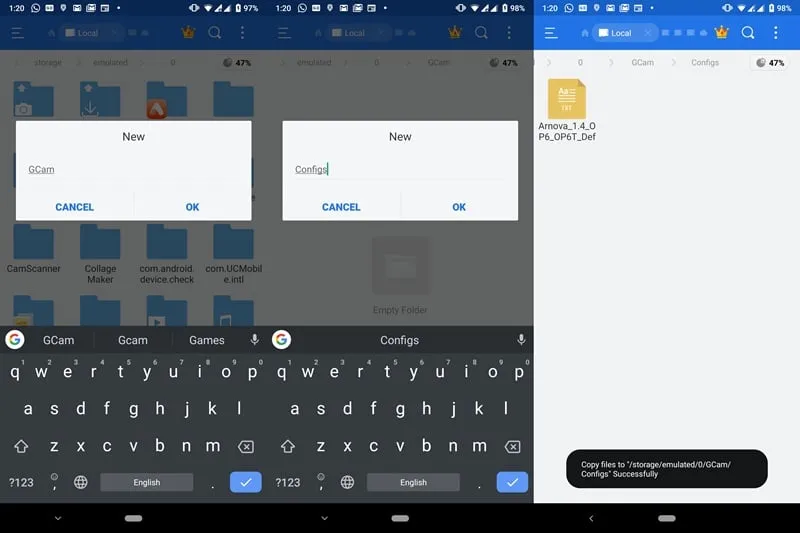
- On the root of your device’s internal storage, create a new folder by the name ‘GCam’.
- Inside the ‘GCam’ folder, create another folder named ‘Configs7’.
- Transfer the downloaded XML file to this newly created ‘Configs7’ folder.
- Next, navigate to the folder where you have downloaded the Google Camera port.
- Tap on the APK file and then follow the on-screen instructions to install the Google Camera Port APK on your OnePlus 6/6T device.
- Once installed, launch the Google Camera app and give it all the necessary permissions.
- Doube tap on the black area next to the shutter button.
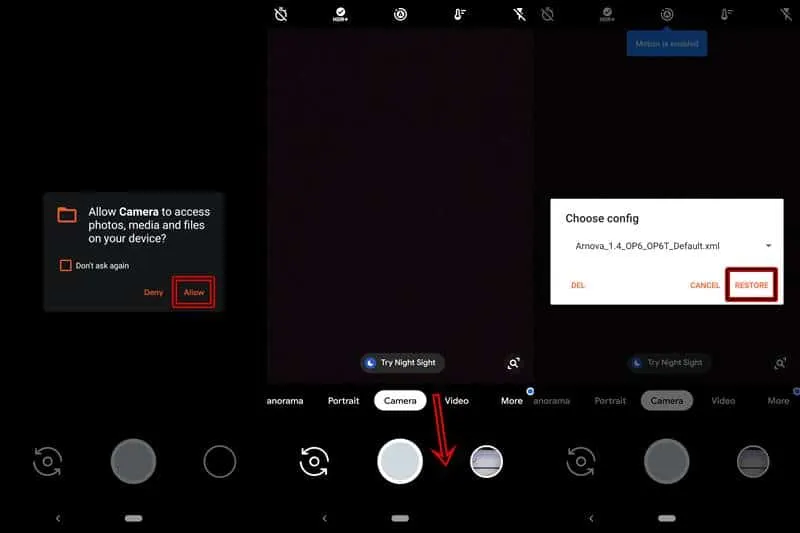
- ‘Choose config’ dialog box would appear.
- Finally, tap on the ‘RESTORE’ button.
Google Camera is now successfully installed on your OnePlus 6/6T device. Go ahead and try clicking amazing pictures with it now. However, if you still aren’t satisfied with the results, go to the ‘Settings’ menu of the camera and try tweaking it as per your requirement or simply load a different config file.
Related Posts:
The Complete Guide to Unbrick OnePlus 6/6T from a Hard-Brick
Google Camera Port for Major OEM Android Devices
Download Google Camera (GCam) Port for OnePlus 7/OnePlus 7 Pro
Download Latest Android 10-based OxygenOS Update for OnePlus 6/6T
How to Easily Root OnePlus 6 and OnePlus 6T using Magisk (Without TWRP)
Some of these ports and XML files have been sourced directly from the OP6/6T telegram group. Huge thanks to them!
Comments
Comments are moderated, and published only if they are relevant to the topic and add value in a constructive way. If you disagree with something, please be polite and respectful. We suggest you read our comment policy before commenting.